








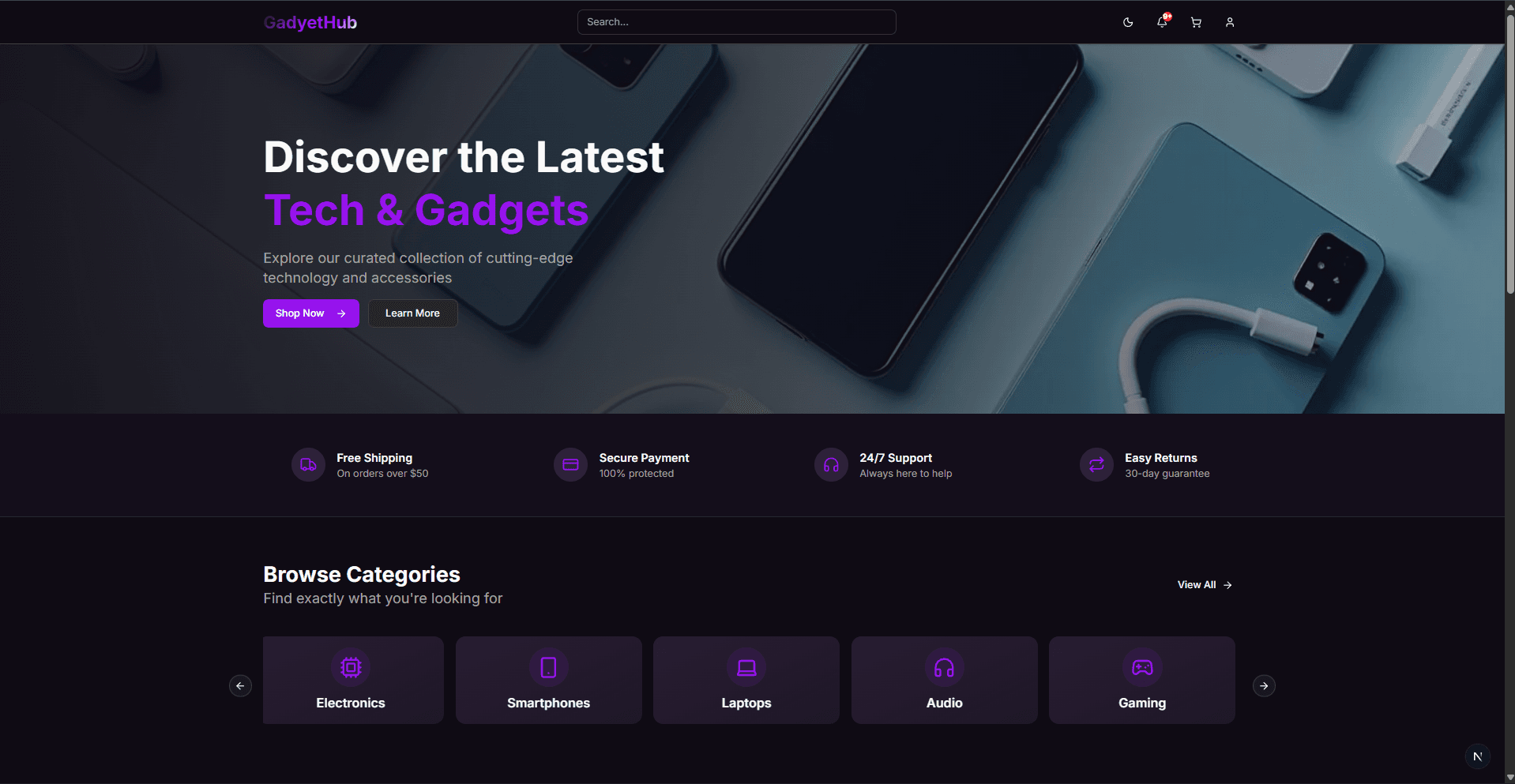
GadyetHub
What this project does
A modern e-commerce marketplace platform for electronics and accessories, built with Next.js, TypeScript, and Supabase. It provides both a customer‑facing storefront and an admin dashboard, complete with authentication, product management, order workflows, and a responsive dark/light UI.
Live demo: https://gadyet-hub.vercel.app/
Why it’s useful
This starter kit is intended for developers who want a working, full‑stack e‑commerce example using the latest Next.js features. It can be used as:
- A learning resource to understand client/server integration with Supabase
- A foundation for launching your own store or adapting to other domains
- A reusable template with authentication, admin tooling, and real‑time updates
Table of Contents
- Key features
- Tech Stack
- Prerequisites
- Installation
- Environment Setup
- Running Locally
- Project Structure
- API Routes
- Development
- Contributing
Key features
Customer-Facing Features
- Responsive Design – Navbar on desktop, collapsible sidebar on mobile/tablet
- Product Browsing – Browse products by category with detailed product pages
- Shopping Cart – Add items to cart and manage orders
- Order Management – View and track your orders
- Notifications – Real-time notifications and alerts
- Forgot Password – Reset your password via email link for account recovery
- Dark/Light Mode – Theme toggle for user preference
Admin Dashboard
- Dashboard Overview – High-level business metrics and KPIs
- Orders Management – View, filter, and update order statuses
- Inventory Management – Add, edit, and delete products; manage stock levels
- User Management – View and manage customer accounts
- Notifications Panel – Monitor system events and alerts
Authentication & Authorization
- Email/password authentication via Supabase Auth
- Role-based access control (Customer / Admin)
- Session persistence with secure cookies
- Protected routes and API endpoints
Tech Stack
Frontend
- Next.js 16 – React framework with App Router
- React 19 – UI library
- TypeScript – Type-safe code
- Tailwind CSS 4 – Utility-first styling
- Radix UI – Headless components (dialogs, dropdowns, tooltips)
- shadcn/ui – Tailwind-compatible component primitives (used across the UI)
- Lucide React – Icon library
- Next Themes – Dark mode support
State & Data
- Zustand – Lightweight state management
- @tanstack/react-table – Headless table component
- Sonner – Toast notifications
Backend & Database
- Supabase – PostgreSQL + Auth + Real-time APIs
- @supabase/supabase-js – JS client
- @supabase/ssr – Server-side rendering support
Developer Tools
- ESLint 9 – Code linting
- TypeScript 5 – Type checking
Prerequisites
Before you begin, ensure you have the following installed:
- Node.js v18+ or v20+ (Download)
- npm or yarn (comes with Node.js)
- Supabase Account – Sign up free
- Git for version control
Installation
-
Clone the repository
git clone https://github.com/zidvsd/gadyethub.git cd gadyethub -
Install dependencies
npm install
# or
yarn install
Environment Setup
Create a .env.local file in the root directory with your Supabase credentials:
# Supabase Public Keys (safe to expose)
NEXT_PUBLIC_SUPABASE_URL=your_supabase_url
NEXT_PUBLIC_SUPABASE_ANON_KEY=your_supabase_anon_key

# Optional server‑side secret (used for service‑role operations)
SUPABASE_SERVICE_ROLE_KEY=your_service_role_key
Getting Supabase Credentials
- Go to Supabase Dashboard
- Create a new project or select existing one
- Navigate to Settings → API in the sidebar
- Copy:
Project URL→NEXT_PUBLIC_SUPABASE_URLAnon key→NEXT_PUBLIC_SUPABASE_ANON_KEY
- Add these values to
.env.local
Database Setup
The application expects the following Supabase tables:
- users – Customer and admin profiles
- products – Product catalog with name, price, stock, image_path
- orders – User orders with status and total_price
- order_items – Line items linking orders to products
- notifications – Stores messages shown to users (used by the real-time alert system)
Refer to your Supabase database schema documentation or create tables using the SQL Editor in your Supabase dashboard.
Running Locally
Start Development Server
npm run dev
The app will be available at http://localhost:3000
Build for Production
npm run build
npm start
Run Linter
npm run lint
Project Structure
gadyethub/
├── app/                           # Next.js App Router
│   ├── (auth)/                    # Auth routes (login, signup)
│   ├── (withSidebar)/             # Customer routes with navbar/sidebar
│   │   ├── cart/
│   │   ├── inbox/
│   │   ├── products/[category]/
│   │   └── page.tsx               # Home page
│   ├── admin/                     # Admin dashboard (protected)
│   │   ├── dashboard/
│   │   │   ├── inventory/         # Product management
│   │   │   ├── orders/            # Order management
│   │   │   ├── users/             # User management
│   │   │   ├── notifications/
│   │   │   └── page.tsx
│   │   └── settings/
│   ├── api/                       # API Routes
│   │   ├── admin/                 # Admin endpoints (protected)
│   │   │   ├── orders/
│   │   │   ├── products/
│   │   │   └── users/
│   │   ├── auth/                  # Authentication endpoints
│   │   │   ├── login/
│   │   │   └── signin/
│   │   ├── client/                # Customer endpoints
│   │   │   ├── orders/
│   │   │   └── user/
│   │   └── products/              # Public product endpoints
│   ├── layout.tsx                 # Root layout with Footer
│   ├── globals.css                # Global styles
│   └── page.tsx                   # Root page
├── components/
│   ├── AppSidebar.tsx             # Navigation sidebar
│   ├── client/
│   │   └── Navbar.tsx             # Top navigation bar
│   ├── admin/
│   │   └── ProductsList.tsx       # Admin product list
│   ├── ui/                        # Reusable UI components
│   │   ├── button.tsx
│   │   ├── card.tsx
│   │   ├── table.tsx
│   │   ├── sidebar.tsx
│   │   └── ...
│   └── Footer.tsx                 # Site footer
├── hooks/
│   └── use-mobile.ts              # Responsive design hook
├── lib/
│   ├── supabase/
│   │   ├── client.ts              # Client-side Supabase client
│   │   ├── server.ts              # Server-side Supabase client
│   │   └── session.ts             # Session utilities
│   ├── types/
│   │   ├── orders.ts              # Order TypeScript interfaces
│   │   └── products.ts            # Product TypeScript interfaces
│   ├── layoutMenus.tsx            # Navigation menu definitions
│   └── utils.ts                   # Helper functions
├── store/
│   ├── useOrders.tsx              # Zustand orders store
│   └── useProducts.tsx            # Zustand products store
├── public/                        # Static assets
├── next.config.ts                 # Next.js configuration
├── tailwind.config.ts             # Tailwind CSS configuration
├── tsconfig.json                  # TypeScript configuration
└── package.json                   # Project dependencies
API Routes
Products (Public)
GET /api/products– Fetch all productsGET /api/products/[id]– Fetch single product
Admin Routes (Protected)
GET /api/admin/orders– Get all ordersPOST /api/admin/orders– Create orderGET /api/admin/orders/[id]– Get order detailsPATCH /api/admin/orders/[id]– Update orderGET /api/admin/products– Get productsPOST /api/admin/products– Create productPATCH /api/admin/products/[id]– Update productDELETE /api/admin/products/[id]– Delete productGET /api/admin/users– Get all usersGET /api/admin/users/[id]– Get user details
Customer Routes (Protected)
GET /api/client/orders– Fetch customer's ordersPOST /api/client/orders– Create orderGET /api/client/orders/[id]– Fetch order detailsGET /api/client/user– Fetch user profile
Authentication
POST /api/auth/login– Login with email/passwordPOST /api/auth/signin– Sign up new accountPOST /api/auth/forgot-password– Request password reset emailPOST /api/auth/reset-password– Submit new password using reset token
Development
Key Technologies & Patterns
Component Architecture
- Server components by default; use
"use client"for interactivity - Reusable UI components from
components/ui/ - Custom hooks in
hooks/for shared logic
State Management
- Zustand stores (
store/) for products and orders - Local state (React hooks) for form handling
- Supabase real-time for live updates
Styling
- Tailwind CSS for utility-first styling
- CSS modules for component-specific styles (if needed)
- Dark mode support via Next Themes
Type Safety
- Full TypeScript support
- Type definitions in
lib/types/ - Strict mode enabled
Common Development Tasks
Add a new page
- Create file in
app/(withSidebar)/orapp/admin/ - Use route-specific layout or create custom layout
- Import components and data as needed
Add a new API endpoint
- Create file in
app/api/<scope>/ - Export async handler (GET, POST, PATCH, DELETE)
- Use
requireAdmin()utility for admin routes - Return standardized response:
{ success: boolean, data?: any, error?: string }
Add a new component
- Create file in
components/ - Use Radix UI components for headless UI
- Import Lucide icons for consistent iconography
- Add TypeScript props interface
Fetch data from Zustand store
import { useProducts } from "@/store/useProducts";

export default function MyComponent() {
  const { products, loading, error, fetchProducts } = useProducts();

  useEffect(() => {
    fetchProducts();
  }, []);

  return <div>{/* render products */}</div>;
}
Contributing
Contributions are welcome! Please follow these guidelines:
- Fork the repository
- Create a feature branch:
git checkout -b feature/your-feature - Commit your changes:
git commit -m 'Add feature' - Push to your branch:
git push origin feature/your-feature - Open a Pull Request with a clear description
Code Style
- Use TypeScript for new code
- Follow ESLint rules:
npm run lint - Use Tailwind CSS for styling
- Keep components focused and reusable
- Add JSDoc comments for complex logic
Support & Documentation
- Issues – Report bugs or request features via GitHub Issues
- Next.js Docs – nextjs.org/docs
- Supabase Docs – supabase.com/docs
- Tailwind Docs – tailwindcss.com/docs
License
This project is licensed under the MIT license. Add a LICENSE file with the MIT text or contact the maintainer.
Maintainer: @zidvsd
Built with Next.js, React, and Supabase.